Microsoft 365 Integrations
Overview
Dashboard Legal integrates with Microsoft 365 using Microsoft’s secure OAuth flow and the Microsoft Graph API. This integration connects Outlook email and calendar context to your work in Dashboard Legal, without replacing Outlook or storing your email content.
With the Microsoft 365 integration, you can:
- Use the Outlook Add-in to file emails and create tasks directly from Outlook
- Push checklist due dates to Outlook and invite others to events
- View Outlook calendar events inside Dashboard Legal, alongside checklist due dates
- Associate emails and calendar events to boards and workstreams using Interlink and activity rules
- (Optional) Use the in-app Email Client for limited workflows, if enabled by your organization
Important: Dashboard Legal does not store your emails or calendar content. Emails and attachments are pushed directly to your organization’s document management system (DMS), such as iManage, NetDocuments, or SharePoint, based on your configuration.
Security & Data Handling
Dashboard Legal is designed to align with legal and enterprise governance requirements.
- Dashboard Legal does not store email bodies or attachments, whether through the Outlook Add-in, Interlink, Activity Association, or the optional Email Client.
- Emails and attachments are saved directly to your configured DMS when filed.
- Calendar events are displayed for visibility and planning; event content is not stored.
- Authentication uses Microsoft OAuth; Dashboard Legal never stores Microsoft passwords.
- Access to Microsoft 365 data is limited to permissions granted during user consent and controlled by org-level settings.
Permissions are feature-based. Dashboard Legal only requests Microsoft permissions required for the features your organization enables. If a feature is disabled (for example, the Email Client), Dashboard Legal will not request or use the permissions associated with that feature.
Admin Setup (Organization Owners & Admins)
Before users can connect their Microsoft accounts, an Org Owner/Admin must enable the Microsoft 365 integration.
Enable Microsoft 365 Integration
- Go to Settings → Integration Settings
- Under Email / Calendar Integration, select Microsoft Outlook (O365)
- Enable the features your organization wants:
- Outlook Add-in
- Calendar Integration
- Interlink / Activity Association
- Email Client (Optional – Advanced)
- Click Save
Administrator Approval (Microsoft Entra / O365)
Some Microsoft tenants require administrator approval before users can authorize third-party applications.
If approval is required:
- A Microsoft administrator must approve Dashboard Legal’s permissions in the Microsoft Admin portal
- Approval may be granted for individual users or org-wide, depending on tenant policy
Microsoft 365 Permissions by Feature
Dashboard Legal requests Microsoft 365 permissions based on the features your organization enables. Permissions are feature-specific and are only requested when required.
Dashboard Legal does not request permissions for disabled features.
Calendar Integration Only
If your organization enables Calendar Integration only, Dashboard Legal requests the following permissions:
- Calendars.ReadWrite
Used to read Outlook calendar events for display in Dashboard Legal and to create or update calendar events when pushing checklist due dates to Outlook.
- MailboxSettings.Read
Used to read mailbox settings such as timezone to ensure calendar events are displayed correctly.
- People.Read
Used for basic user and attendee lookups related to calendar events.
Calendar Integration + Activity Summary
If your organization enables Calendar Integration and Activity Summary, Dashboard Legal requests the following additional permissions:
- User.Read
Used to identify the signed-in Microsoft account.
- Mail.Read
Read-only access used to associate emails with boards and workstreams for activity summaries. Email content is not stored.
- People.Read
Used for contact and participant lookups related to emails and calendar events.
In this configuration, the full set of permissions requested includes:
- User.Read
- Mail.Read
- People.Read
- Calendars.ReadWrite
- MailboxSettings.Read
Outlook Add-In
If your organization enables the Outlook Add-In, Dashboard Legal requests additional permissions to support email-based actions initiated by the user directly from Outlook.
Additional permissions required:
- Mail.ReadWrite
Required to allow users to file emails, create tasks from messages, and save attachments to the document management system (DMS) using the Outlook Add-In.
These permissions are used only to perform user-initiated actions. Emails remain in Outlook and are not stored in Dashboard Legal.
If the Outlook Add-In is disabled, these permissions are not requested.
For more information, see:
Outlook Add-In Overview and Setup
Link Your Microsoft Account (End Users)
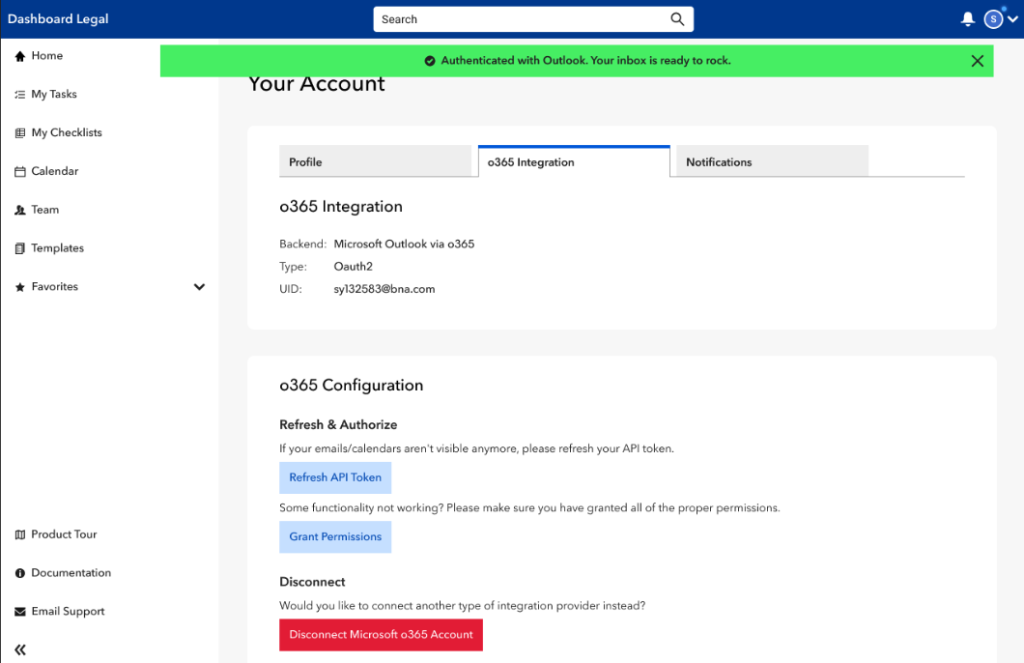
Once the integration is enabled at the org level, each user connects their own Microsoft account.
- Go to Account → Email Preferences
- Select Microsoft Outlook (O365)
- Complete the Microsoft sign-in and consent flow
If your connection needs to be refreshed later:
- Refresh API Token – refreshes authorization
- Grant Permissions – re-prompts for consent if new features are enabled
- Disconnect Account – removes access
Outlook Add-in
The Outlook Add-in is the primary way users interact with Microsoft 365 in Dashboard Legal.
With the add-in, you can:
- File emails directly from Outlook to a board or workstream
- Save email attachments directly to your DMS
- Create checklist items from emails
- Interlink emails to Dashboard Legal work without moving or copying the email
Calendar Integration
Dashboard Legal’s Calendar integration works in two directions, giving you both planning control and visibility—without replacing Outlook.
Push Dashboard Legal Due Dates to Outlook
You can send checklist due dates from Dashboard Legal to your Outlook calendar.
What this enables
- Create Outlook calendar events from checklist items
- Invite other attendees using Outlook
- Keep personal and team calendars aligned with matter timelines
Good to know
- Events are created in Outlook using your Microsoft account
- Dashboard Legal does not store calendar event content
- You control updates and invitations in Outlook
View Outlook Calendar Events in Dashboard Legal
You can display Outlook calendar events inside the Dashboard Legal calendar alongside checklist due dates.
What this enables
- A unified calendar view showing Outlook events and Dashboard Legal tasks
- The ability to layer calendars on or off by client, board, or workstream
- Better visibility into availability and workload across matters
Good to know
- Calendar events are shown for planning and context only
- Event content is not stored in Dashboard Legal
- Visibility respects Outlook permissions and org settings
Interlink & Activity Association
Interlink connects emails and calendar events to your boards and workstreams so activity appears alongside the work—without storing the underlying content.
How it works
- Emails and events are associated using configurable board and workstream rules
- Only references and metadata are stored in Dashboard Legal
- Attachments are pushed directly to your DMS when saved
Why it matters
- Preserve a complete activity trail
- Keep documents governed by your DMS
- Avoid duplicating or storing email content
Email Client (Optional)
Advanced Feature
The Dashboard Legal Email Client allows limited email visibility and actions inside Dashboard Legal. This feature is optional and must be enabled by your organization.
Good to know
- Dashboard Legal is not an email replacement
- Emails continue to live in Outlook
- The Email Client is not required for:
- Outlook Add-in
- Calendar integration
- Interlink or activity association
When to use
- Your organization has explicitly enabled it
- You want basic email visibility without switching tools
When not to use
- If your primary workflow is Outlook
- If you only need filing, calendar context, or Interlink